
Automatic Installation

Buy Virtual Server |
Virtual Server Rental

Buy a virtual server to get a high-performance virtual server rental solution designed for applications and websites that require speed, stability, and scalability.

View Packages
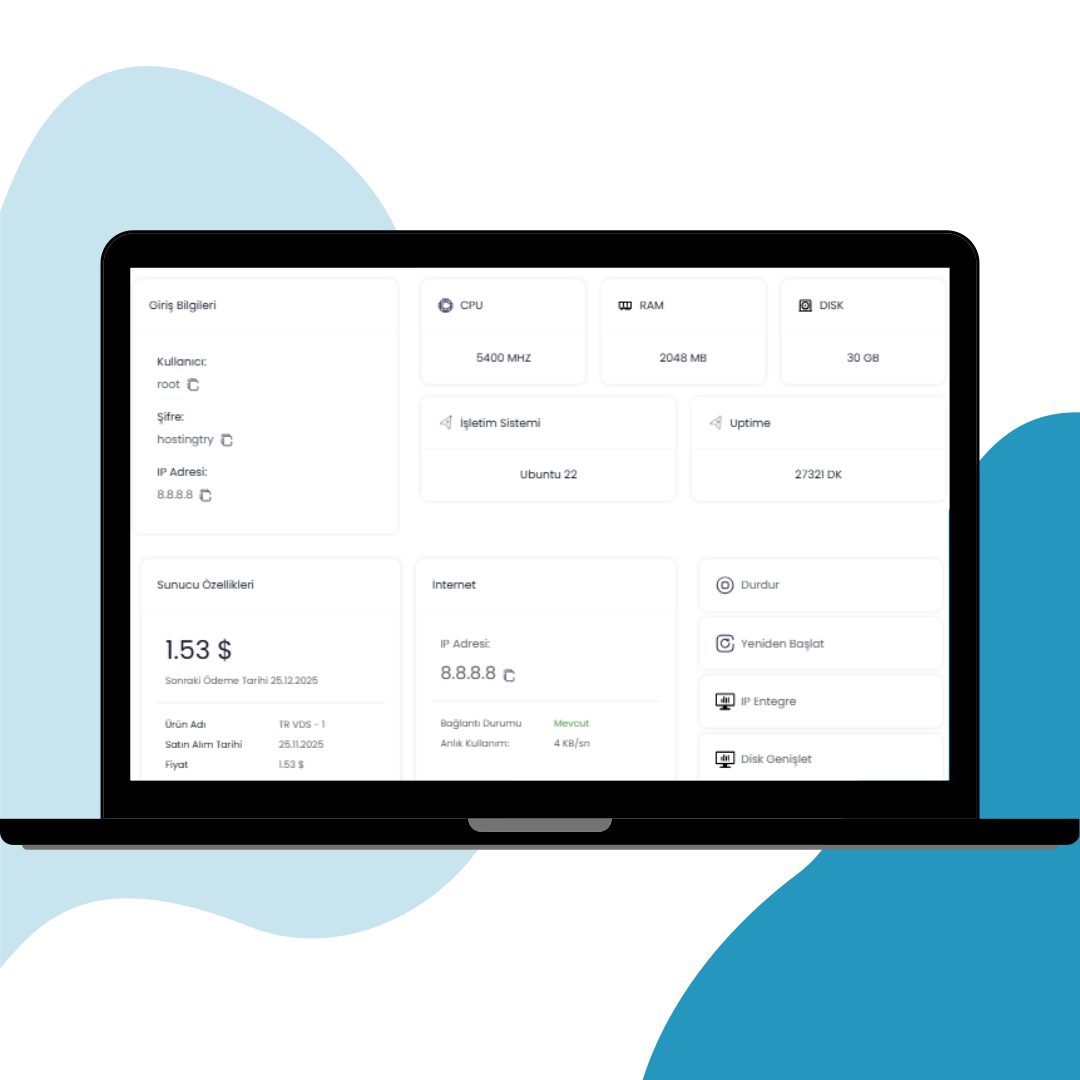
Virtual Server Control Panel

What Is a Virtual Server?

A virtual server is a machine designed to host software and data in order to run applications or websites. One of the main reasons it is called “virtual” is that it uses only a portion of the physical resources of a server managed by a third-party provider. Despite this, virtual servers play a critical role by providing dedicated access to allocated resources and offering significant advantages in terms of control and efficiency.

A virtual server divides the resources of a physical server into multiple isolated environments, giving users greater control over their server infrastructure. As a virtualization technology, virtual servers are designed with flexibility in mind, allowing you to scale resources such as RAM, CPU, and disk space when increasing traffic begins to exceed your initial capacity. Websites and applications that rely on virtual servers operate across a wide range of industries. E-commerce platforms, corporate websites, and blogs in particular depend heavily on virtual servers for reliable hosting. In addition, virtual servers are commonly used for file transfer protocols, email servers, and data storage, demonstrating their broad range of use cases.

Virtual servers, which enable multiple independent environments to run on a single physical server, provide full root access to each user. This level of flexibility—such as installing custom software tailored to specific needs—is one of the key reasons virtual servers are widely preferred.

Derived from the term “Virtual Server,” virtual servers are also commonly referred to as VPS. Encountering such terminology is almost inevitable for anyone operating a website or application online. As internet usage continues to grow, these concepts have become increasingly common. Whether you are an application developer, run an online store, or plan to launch a corporate or personal blog, you need a server to ensure your project remains accessible on the internet. In this context, virtual servers provide a different operating model compared to physical servers, offering greater flexibility and efficiency.

By leveraging virtualization technology, virtual servers create independent virtual machines that function as separate servers. Thanks to their many advantages, virtual servers are used for a wide variety of purposes and are highly effective in optimizing resource utilization. CPU, RAM, and storage resources on a physical server are shared efficiently among multiple virtual servers, resulting in better overall performance and cost efficiency. This makes virtual servers a practical and financially efficient solution across many industries.

Core Features of a Virtual Server

Isolated Resources

CPU, RAM, and disk resources are fully dedicated to you and are not shared with other users.

High Performance

Thanks to isolated architecture, it delivers stable, uninterrupted, and high-performance operation.

Full Root Access

With an independent operating system, you have full control and customization over your server.

Advanced Security

The isolated environment minimizes security risks and allows you to implement your own security policies.

Flexible & Scalable

Resources such as CPU and RAM can be increased quickly as needed, making this structure ideal for growing projects.

Why Choose Hostingtry Virtual Server?

Virtual server infrastructure optimized for enterprise-level projects

Enterprise SSD Storage

Maximum performance with high read and write speeds.

Full Root Access

Complete control and freedom to configure your server as needed.

DDoS-Protected Infrastructure

Advanced network protection for uninterrupted service.

Virtual Server Operating Systems

Choose the most suitable operating system for your virtual servers. Deploy popular Windows and Linux distributions with just a few clicks.

Windows
Windows 7 Windows 10 Windows 11 Windows Server 2012 Windows Server 2016 Windows Server 2019 Windows Server 2022 Windows Server 2025
centos
CentOS
CentOS 7 CentOS 8
ubuntu
Ubuntu
Ubuntu 18.04 Ubuntu 20.04 Ubuntu 22.04
debian
Debian
Debian 8 Debian 10 Debian 11
Rocky Linux
Rocky Linux 8 Rocky Linux 9
AlmaLinux
Alma Linux 8 Alma Linux 9
FreeBSD
FreeBSD 13 FreeBSD 14
ESXi
ESXi 7
cPanel
Plesk

Virtual Server Packages

Scalable, high-performance Virtual Server packages tailored to your project needs

TR VDS - 1
Xeon E5-2699 v4
2 vCPU
2 GB
DDR4 RAM
30 GB
SSD Disk
1 Gbit/s
Port
Turkey
Location
64,90 ₺
/ Monthly
Order Now
TR VDS - 2
Xeon E5-2699 v4
2 vCPU
4 GB
DDR4 RAM
40 GB
SSD Disk
1 Gbit/s
Port
Turkey
Location
74,90 ₺
/ Monthly
Order Now
TR VDS - 3
Xeon E5-2699 v4
4 vCPU
6 GB
DDR4 RAM
50 GB
SSD Disk
1 Gbit/s
Port
Turkey
Location
99,90 ₺
/ Monthly
Order Now
TR VDS - 4
Xeon E5-2699 v4
4 vCPU
8 GB
DDR4 RAM
60 GB
SSD Disk
1 Gbit/s
Port
Turkey
Location
139,90 ₺
/ Monthly
Order Now
TR VDS - 5
Xeon E5-2699 v4
6 vCPU
10 GB
DDR4 RAM
70 GB
SSD Disk
1 Gbit/s
Port
Turkey
Location
179,90 ₺
/ Monthly
Order Now
TR VDS - 6
Xeon E5-2699 v4
6 vCPU
12 GB
DDR4 RAM
80 GB
SSD Disk
1 Gbit/s
Port
Turkey
Location
219,90 ₺
/ Monthly
Order Now
TR VDS - 7
Xeon E5-2699 v4
6 vCPU
14 GB
DDR4 RAM
90 GB
SSD Disk
1 Gbit/s
Port
Turkey
Location
239,90 ₺
/ Monthly
Order Now
TR VDS - 8
Xeon E5-2699 v4
6 vCPU
16 GB
DDR4 RAM
100 GB
SSD Disk
1 Gbit/s
Port
Turkey
Location
279,90 ₺
/ Monthly
Order Now

Our Other Server Solutions

You can explore different virtual server options based on your project requirements.

What Are the Advantages of a Virtual Server?

Due to their various advantages, virtual servers are preferred by both individual users and enterprises. They offer a wide range of features and provide significant benefits not only during usage but also throughout the installation process.

As a server technology used for website hosting and application development for many different purposes, virtual servers stand out with their flexible and efficient structure. This naturally increases interest in the question how to set up a virtual server. The answer can be explained as follows:

  • To begin the virtual server installation process, hardware requirements must first be identified. These requirements are divided into two categories: the physical server and virtualization support. Once the hardware requirements are defined, you can proceed to the next step.
  • Another important step in virtual server installation is selecting the virtualization software. There are several available options, and it is important to ensure that the chosen software fully meets your hardware requirements.
  • In the next stage, the installation process must be carried out to connect to the virtual server. You should download the selected software and start the installation by mounting it via USB or CD/DVD on your physical server. The installation wizard will guide you through this process. After configuring the network settings, the installation can be completed.
  • After installation, you can begin using the virtualization management tool. This tool allows you to manage virtual machines efficiently once the setup is complete.
  • To make usage more effective, you need to create your own virtual server. A virtual server is also referred to as a VM (Virtual Machine). Using the management tool, allocate CPU, RAM, and disk space to the VM. After installing the operating system and completing network configuration, the VM will be ready for use.
  • Once configuration, startup, and testing stages are completed, you can begin using your virtual server for your intended purposes.

Following these steps is sufficient for creating a virtual server. Individuals with no prior experience often worry that the installation process may be difficult. However, virtual servers—powered by flexible virtualization technology—are designed to assist users during setup and eliminate potential confusion or technical issues. This allows you to complete the installation smoothly and start using your virtual server for various purposes such as application development or website hosting.

enterprise ssd storage
Enterprise SSD Storage

Fast-loading and stable infrastructure with high read and write speeds.

high performance
High Performance

Stable operation even under heavy load with dedicated CPU and RAM.

root access
Root Access & Full Control

Full administrative privileges with complete freedom to configure and install software.

backup
Backup & Snapshots

Snapshot and backup support to keep your data safe.

uptime
Uptime Guarantee

High-availability infrastructure for uninterrupted service.

high bandwidth
High Bandwidth Support

Powerful network infrastructure for high-traffic projects.

scalable resources
Scalable Resources

Easily upgrade CPU, RAM, and disk resources as your needs grow.

low latency
Low Latency

Low ping and fast access with Turkey-based infrastructure.

secure infrastructure
Secure Infrastructure

Maximum security through isolated virtualization technology.
Where Are Virtual Servers Used?

It is possible to give multiple answers to the question what is a virtual server used for, as virtual servers provide an integrated working system across various industries. With a wide range of use cases, virtual servers adapt to specific needs in every scenario they are used. The most common usage areas include:

  • Web hosting: Hosting is one of the most fundamental areas where virtual servers are required. This includes websites, web applications, and e-commerce platforms. Virtual servers are considered one of the best options for web-based applications and websites, as they provide customers with isolated environments, significantly improving user experience. Since e-commerce platforms must be secure, virtual servers are especially preferred due to their customizable structure.
  • Virtual servers are also widely used for cloud and backup systems, offering a robust infrastructure that can be configured according to individual needs. They are also a suitable option for software companies and application providers.
  • Database servers and test & development environments are among the areas where virtual servers are essential. They provide high performance and redundancy for database management and are ideal for testing different operating systems or configurations. In CI/CD environments, virtual servers significantly simplify workflows.
  • If you want to create a virtual desktop infrastructure, virtual servers are an excellent choice. This technology allows access to virtual desktops from any device, saving time and increasing efficiency, especially for companies operating with remote work models.
  • Student laboratories, certification programs, and training courses also benefit from virtual servers, as they work with multiple systems simultaneously.
  • Email servers and security solutions also require virtual servers. You can use them to deploy firewalls, create private network environments, and even perform cybersecurity testing.
  • Online gaming is another major use case for virtual servers. Especially in multiplayer games, server-based infrastructures are essential. Virtual servers reduce latency and significantly increase scalability.

From this perspective, virtual servers play a crucial role in terms of flexibility and cost efficiency. Their scalable and adaptable structure allows them to meet the needs of almost every industry. If you are looking for a reliable and cost-effective solution, you can benefit from virtual server solutions offered with HostingTRY assurance.

buy virtual server
server

Are Virtual Servers Secure?

Virtual server services provide a secure environment when properly configured and managed. Virtual server security is directly related to how well both physical and virtual infrastructures are managed. There are several important factors to consider in order to maintain a high level of security:

  • During virtual server usage, special attention should be paid to isolation. Virtual servers operate using virtualization technology, where multiple machines run on a single physical server. Since each virtual server is isolated, a security issue in one server does not affect others, ensuring data privacy and separation.
  • Regular updates and patch management are essential. Failure to apply updates may lead to security vulnerabilities. Using strong passwords, keeping systems up to date, and enabling multi-factor authentication significantly increases security.
  • Deploying firewalls helps monitor and control traffic between servers while preventing potential threats. Additionally, using a VPN can further enhance security.
  • Data encryption, backup, and recovery are critical security measures. Data should be encrypted during storage, transmission, and application usage, and backups should be stored securely to minimize data loss risks.
  • Implementing access control, keeping audit logs, and limiting server access to authorized users only helps maximize security and eliminate potential vulnerabilities.
  • Protecting against malware is essential. Antivirus solutions prevent malicious software from compromising the operating system, while regular security updates further strengthen protection.
  • Conducting penetration tests and continuous security monitoring helps identify vulnerabilities. Regular testing ensures that issues are detected and resolved before they can be exploited.

By applying these measures and understanding the key security factors, virtual server usage becomes highly secure. These precautions are straightforward yet highly effective in maintaining a safe and reliable server environment.

What Are the Advantages of a Virtual Server?

The answer to the question what is a virtual server is that it is a type of server designed to make the use of websites on the internet more efficient. A virtual server, developed using virtualization technology, offers various features and advantages during operation. The main factors that make virtual servers such a widely preferred solution include the following:

  • Virtual servers provide cost efficiency. They play a crucial role in minimizing hardware costs. Even when multiple virtual servers are used, they operate on a single physical server, reducing the need for additional physical hardware. This also lowers energy consumption and enables more flexible billing. Since you only pay for the resources you need, it helps prevent unnecessary financial burden.
  • Virtual servers are considered a flexible and scalable solution. They allow resources to be increased or decreased quickly. This makes them ideal for workloads that require adaptability. If you need to create a new virtual server or increase existing server resources, it can be done in just a few minutes. Eliminating time-consuming, complex processes is one of their key advantages.
  • Easy portability between physical servers is another major benefit. Moving between data centers or completing backup operations becomes much easier with virtual servers.
  • Virtual servers are preferred for providing uninterrupted service. In the event of a physical server failure, a virtual server can be rapidly migrated to another server. This ensures service continuity and protects against risks caused by downtime.
  • They offer significant advantages in data backup and recovery. There is no need for extra effort to perform regular backups. Data can be restored quickly from backups, minimizing the risk of data loss.
  • VDS virtual servers operate with a different working model, but this does not mean they are insecure. Since virtual servers are isolated from one another, a security vulnerability in one server does not affect others. With custom network configurations, they can successfully meet the security requirements of environments that demand different security levels.
  • Virtual servers are among the most ideal solutions for test and development environments. When development or testing teams need to create new environments, virtual servers provide great convenience, especially when environments need to be removed or recreated. They accelerate development cycles and are also highly effective for testing different operating systems and software configurations.
  • Virtual servers excel in centralized management and automation. In addition to ease of management, automated backup and monitoring contribute to an integrated and efficient working system. These factors significantly streamline operational workflows.

All of these factors are among the main reasons for the growing demand for buying virtual server services. Virtual servers, suitable for both corporate and individual solutions, successfully adapt to changing requirements and are considered an effective solution in many aspects.

sunucu satın al

What Is the Difference Between a Virtual Server and a Physical Server?

The growth of internet usage has led to an increase in technical developments in this field. Especially in recent years, it is well known that online activities have increased at an unstoppable pace. These include critical daily-life transactions such as shopping and banking. All of these operations are carried out through applications or websites. This situation highlights the importance of websites and applications on the internet and the advantages they must provide during usage. As a result, the use of virtual and physical servers has become increasingly important, making the question of the difference between virtual and physical servers one of the most researched topics.

For a website or application operating online to ensure customer satisfaction and provide uninterrupted, active service, a server is required. This server may have different characteristics, and it is also possible to say that there are various server options used for this purpose. Among these are virtual servers and physical servers. Virtual servers have several important differences compared to physical servers. These differences can be explained as follows:

  • Physical servers have full ownership of all hardware resources and use a single resource pool. Since the hardware is assigned directly to a single operating system, flexible usage is not possible. In virtual servers, however, physical server resources are virtualized. This allows multiple virtual servers to be created. Each virtual server runs its own independent operating system, providing greater flexibility. This makes hardware and resource management one of the most fundamental differences between virtual and physical servers.
  • Physical servers are hardware-based. Due to limited flexibility, increasing resources requires adding physical hardware. This leads to higher costs and is a time-consuming process. Virtual servers, on the other hand, offer much greater flexibility. Resources can be adjusted dynamically and new servers can be created quickly, making them a more cost-effective solution.
  • The high purchase cost of physical servers has contributed to the growing interest in virtual servers in recent years. In addition to energy consumption and cooling costs, regular maintenance expenses are also included, resulting in high overall costs. Virtual servers operate on the principle of hosting multiple virtual machines on a single physical server, which significantly reduces hardware costs. In cloud-based virtual server solutions, you only pay for the resources you use, playing a major role in optimizing and minimizing costs.
  • Another key difference between physical and virtual servers is management and maintenance. Managing and maintaining physical servers is more complex and labor-intensive. Each server requires separate physical access, meaning updates must be performed individually. Additionally, a single issue on a physical server can affect the entire system, leading to operational challenges. Virtual servers, however, can be managed easily through centralized software. Tasks such as backup, updates, and maintenance can be performed automatically and efficiently with virtual servers.
  • Physical servers provide direct access to hardware, meaning security control is also handled directly. Virtual servers, on the other hand, operate with isolated environments. This isolation prevents a security issue in one server from affecting other virtual servers.
  • Virtual servers also offer advantages in terms of performance, backup, and risk mitigation. In addition, physical servers are not portable. Virtual servers, being independent of physical hardware, can be moved easily when needed. This flexibility is highly beneficial for ensuring business continuity.

What Are the Types of Virtual Servers?

A machine that hosts all the software and data required to run an application or a website can be defined as the answer to the question what does a virtual server mean. Although virtual servers are generally considered as a single concept, they offer multiple options to meet different needs and operate based on virtualization technology. Since they are categorized according to server configuration, it is possible to say that there are different types of virtual servers. Virtual server types include:

Shared virtual servers: If the resources on a physical server are shared among multiple users, this type is referred to as a shared virtual server. Shared virtual servers provide each user with a dedicated virtual space. Since these spaces are isolated, they offer a fully user-specific environment.

Virtual private servers: When the resources of a physical server are virtualized and transformed into independent virtual servers, this is called a virtual private server. This type of server is particularly suitable for e-commerce websites, test environments, and medium-sized websites.

Dedicated servers: When a physical server is allocated to a single user, but virtualization software is used on that physical server to create multiple virtual machines, this is referred to as a dedicated server. This server type is mostly preferred for applications that require high performance. Full control helps maximize overall performance.

virtual server rental
virtual server pricing

Cloud servers: A cloud server is a server type that enables multiple physical servers in large data centers to operate simultaneously and offers advantages through automatic resource scaling. Due to its high flexibility, it is an ideal option for applications with variable workloads.

Managed servers: Since server management is handled by the service provider, operations such as backup and security are performed centrally and efficiently. Although managed servers are more expensive than unmanaged ones, they are the most reasonable option if you do not have technical expertise.

The servers listed above are among the most commonly preferred virtual server types. Developed to meet different needs and categorized into various groups, virtual servers offer varying characteristics in terms of performance, efficiency, and cost.

What Does a Virtual Server Offer?

Virtual servers come with a variety of features and therefore offer different advantages. They can be preferred by both businesses and individuals. Depending on the intended use and purpose, the benefits they provide may vary. The technical details offered by virtual servers can be outlined as follows:

One of the most important advantages offered by a virtual server is dedicated resources. Since storage, RAM, and CPU resources are allocated specifically, multiple users can operate on a single physical server, creating an integrated and efficient working environment.

With a virtual server, performance becomes predictable. Since resources operate in isolated environments, they deliver consistent performance, making it easier to anticipate system behavior.

Virtual servers prevent the impact of fluctuations that may occur during resource usage, making them a highly secure solution. Isolation and dedicated IP addresses are effective in mitigating potential security risks. From this perspective, security should be considered one of the most important advantages offered by virtual servers.

rent virtual server
virtual server service

One of the core features offered by a virtual server is full management access. This provides a high level of control and creates significant advantages. Since users are granted full control and administrator-level access, potential risks can be addressed more effectively. Users can install software, configure systems, and customize the server according to their specific needs.

Virtual servers are also cost-effective. Compared to physical servers, they are more affordable, while still providing all the advantages of physical servers— and in many cases, even more. Despite this, maintenance and operational costs remain lower. Pay-as-you-use models help businesses choose solutions that match their needs without facing excessive expenses.

Another factor that makes virtual servers stand out is their customizability. With full access permissions, you can install any software you want on your server or run your own applications in an integrated manner. The ability to configure the server based on user needs demonstrates its flexibility and ensures requirements are fully met.

Virtual servers are one of the most ideal options for development environments. They create an excellent setup for testing processes and software development. Frequently preferred for testing applications across different operating systems, virtual servers also offer easy backup and recovery features. Automatic backup options help prevent potential data loss. Advanced networking capabilities and multi-user support are also among the advantages provided by virtual servers.

However, there is no single answer to the question how to connect to a virtual server. Connection methods vary depending on the type of virtual server, the platform used for access, and the operating system.

Virtual Server Frequently Asked Questions

Clear and concise answers to the most common questions about our Virtual Server services

A virtual server is a hosting infrastructure where an isolated portion of a physical server is dedicated exclusively to you, providing full management and software installation freedom. It allows you to securely and efficiently host projects such as applications, websites, software services, and game servers.

Virtual servers can be used for website hosting, e-commerce stores, game servers, running APIs and software, test and development environments, database hosting, email servers, and remote desktop solutions.

Yes. Root access is provided on Linux servers and administrator access on Windows servers. You can install, configure, and customize all software according to your needs.

Virtual servers operate on isolated infrastructure, meaning other users’ traffic or security issues do not affect your data. When firewall rules, encryption, snapshots, and backups are properly configured, virtual servers offer a high level of security.

Yes. Depending on your workload and bandwidth requirements, RAM, CPU, disk space, and bandwidth can be upgraded within minutes. No reinstallation or migration is required, and there is no service interruption.

Optional automatic backup and snapshot solutions are available. You can restore your backups at any time and minimize the risk of data loss.